
Setup is a guided checklist
Pay schedule, overtime rules and time off, one step at a time. Prefer to talk it through? It reads each question aloud, you answer by voice or typing, and nothing saves until you confirm.
Time clock & timesheets
A guided setup gets you running, your crew joins from a link with nothing to install, and they clock in from their own phones. You approve timesheets, and approved hours, overtime and time off export ready for the payroll provider you already use.
The hard part of a new time clock is getting everyone on it. PunchOutPayroll is built around that first week.
Pay schedule, overtime rules and time off, one step at a time. Prefer to talk it through? It reads each question aloud, you answer by voice or typing, and nothing saves until you confirm.
Import your crew from a spreadsheet, a pasted list or a photo of your roster, and check the list before anyone is added.
Invite each person by email or a joining code. The app opens in their phone’s browser and can go on the home screen. No app store, no download.
Forgot to punch? They send the fix from their phone with a reason, and nothing changes until you approve it.
Watch
The whole onboarding: name your business, talk through setup, add and invite your crew, and their first punch.
Here's your first day with PunchOutPayroll, from signing up to your first employee on the clock. Name your business, and your company is ready.
Prefer to talk it through? Answer three questions, out loud or by typing: what kind of business you run, who works for you, and how often you pay.
It reads back what it heard, and nothing changes until you confirm. Your crew's names go straight into Add employees.
A setup checklist shows what's left. Add a sick time policy from a template, then confirm your pay schedule and leave defaults.
Check the names, add each person's email, and confirm.
Then invite them. Each person gets a link and a joining code. There's no app store, and nothing to install.
On her phone, Maya opens the link and joins Corner Coffee. One tap, and she's punched in, with a receipt for the exact time.
Back on your overview, she's on the clock. Your crew is set up, and payroll-ready hours start today.
Keep the payroll provider you already use. PunchOutPayroll handles everything that comes before it.
Clock-in from any phone, with location checked at the punch. See who’s on the clock, live.
Review each person’s week with overtime and breaks, handle missed-punch fixes and time off from one list, then approve.
Approved hours, PTO and sick time come together, with a readiness check before you close the period and a payroll-ready file for your provider.
Built for crews on the move: restaurants, construction and any team that needs a GPS time clock app. Owners get an owner dashboard that shows what’s next.
A setup checklist walks you through your pay schedule, overtime rules and time-off policies. Prefer to talk it through? Answer out loud or by typing, and confirm before anything saves.
Bring in the crew list you already have, then send each person an invite link or a joining code. They set up their own sign-in, with no app to download.
From their own phones, with location checked at the punch. You see who’s on the clock, live.
Clear what needs attention, approve hours and export for payroll.
Watch
From a punch on a phone to payroll-ready hours.
Your crew does the work. You run payroll. PunchOutPayroll handles everything in between: the punches, the corrections, the approvals, and the hours your payroll provider needs.
It starts on your crew's own phones, with nothing to download. They open the app in the browser and tap once to punch in. The time is recorded the moment they tap, with a receipt they can see.
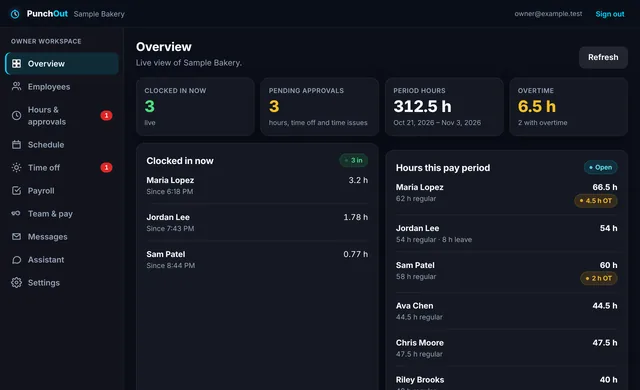
On your side, the overview is live. You see who's on the clock right now and how long each shift has run, the hours building up for the pay period, and any overtime.
Anything that needs your attention lands in one list. Here, Ava never clocked out, so her shift is still running. One click takes you straight to her timecard.
Add the missing clock-out and give a reason. The time, the reason, and who made the change are kept on the record, so there's never a question later about why hours moved.
Then approve every clean day in one step. If an approved day changes later, it comes back for review.
At the end of the period, the readiness check looks over everything before payroll, and tells you in plain language what still needs attention.
When it's clear, submit the period, and the hours are locked.
Then download the hours: a file laid out for the payroll provider you already use, or a plain spreadsheet. PunchOutPayroll prepares the hours. Your provider runs payroll.
For your employees
Your crew stop calling, texting and guessing about hours. It’s all in their pocket.
Watch
Punch in, check hours and see time-off balances from a phone.
Your crew gets their own app, and there's nothing to install. It opens right in the phone's browser, and they can add it to the home screen like any other app.
One tap punches them in. The time is saved the moment they tap, and they get a receipt with the exact time: the same time you see.
My hours shows every day of the pay period: when they came in, when they left, their breaks, and whether you've approved the day yet.
They always know where they stand on time off. Every balance shows what's available and exactly how it was earned, so there's no guessing before they ask for a day.
And if they forget to punch, they send a fix from their phone with the right time and a reason. You review it before anything changes.
Questions come up between clock-in and payroll. Our plain-English time clock and timesheet guides cover fixing missed punches, how overtime is calculated, break laws by state, buddy punching and how to calculate labor cost. When you’re ready, start a 14-day trial and see your own crew on the clock.
Payroll gets complicated fast once you have a lot of people: missed punches, PTO in spreadsheets, hours you can’t verify. PunchOutPayroll was built by someone who knows that mess firsthand, so owners don’t have to settle for it.
Our story →Set up your company, invite your crew and see who’s on the clock. Start with a 14-day trial.